


HubSpot and Airtable integration
Integrate Airtable and HubSpot in minutes. Sync contacts, deals and other records.
Sync new Airtable records to HubSpot
Sync how you like: Configure which contacts are synced to HubSpot, along with data from preferred columns.
Easily start selling to segments you’ve defined in Airtable. Save all the time wasted on managing lists.

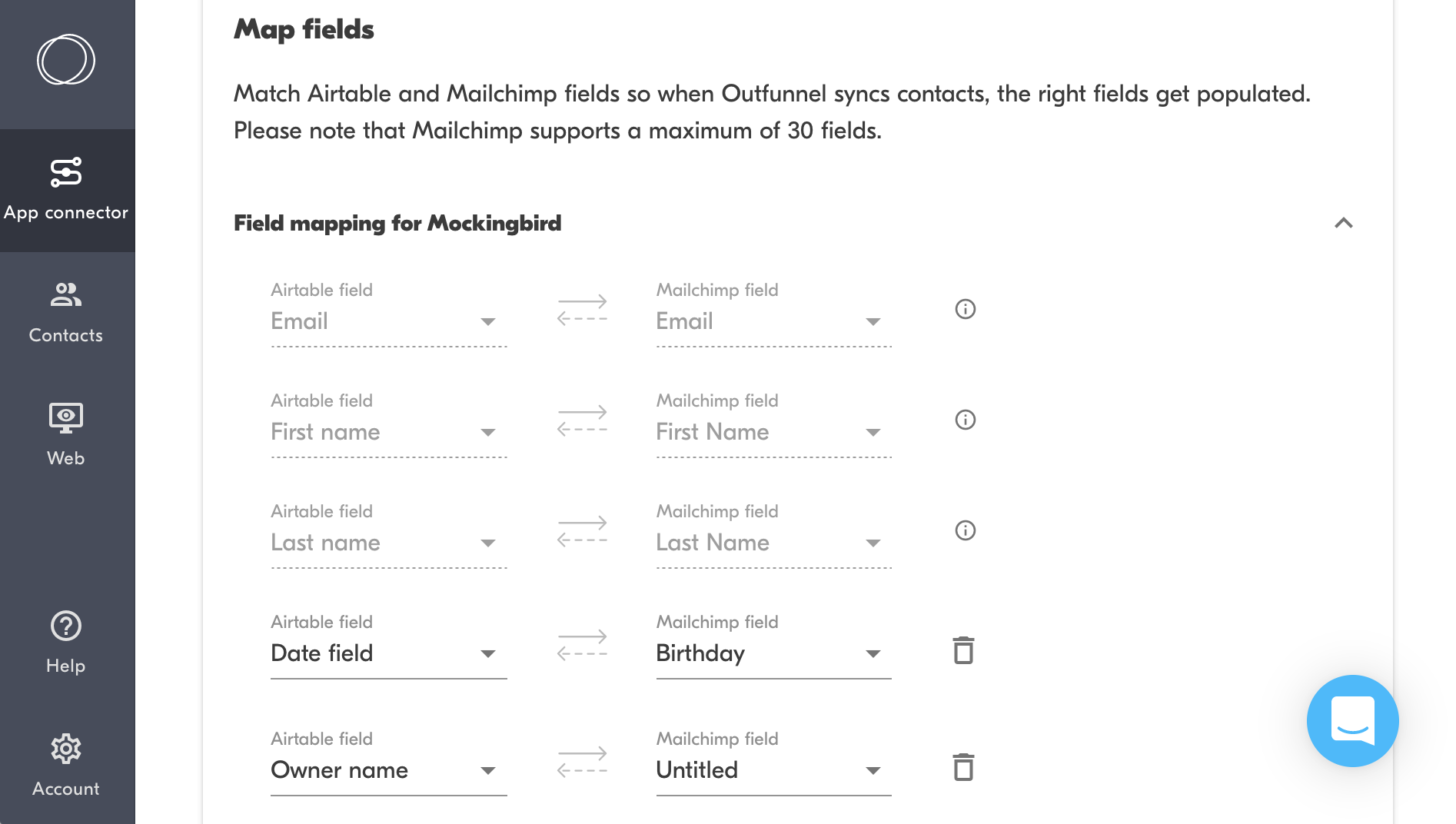
Match Airtable columns & HubSpot properties
Choose which fields should be kept in sync between the two systems and Outfunnel will make sure your databases will be up to date from here on out.
Whenever a field is updated in Airtable, the change will be synced over to HubSpot automatically.
Sync data from HubSpot to Airtable (Coming soon)
Sync new HubSpot contacts, deals or activities to Airtable as new rows.
Frequently asked questions
Why should I use Outfunnel instead of the native integration?
HubSpot’s native Data Sync and Airtable’s own HubSpot extension cover the basics, but most teams hit the ceiling pretty quickly.
Common frustrations with the native options:
- Airtable’s HubSpot extension is one-way only (HubSpot > Airtable), so it’s fine for reporting but won’t push anything back.
- HubSpot Data Sync requires a paid Data Hub tier and only matches on email or last modified time — no linked records, lookups, or rollups.
- No deduplication on either — so if a contact exists in both tools under slightly different data, you’ll end up with duplicates.
- No historical sync — only changes after setup are captured, so your existing data stays out of date.
Outfunnel does a comprehensive Airtable > HubSpot sync with built-in deduplication (two-way sync coming soon), picks up your existing records from day one, and supports the Airtable field types that the native options skip — linked records included.
Outfunnel vs Zapier: what’s the difference for HubSpot–Airtable syncing?
Outfunnel is purpose-built for the kind of integration that HubSpot–Airtable sync is. Unlike generic iPaaS tools such as Zapier or Make, it offers pre-defined sync workflows, bi-directional contact and engagement syncing, reliable monitoring, and fewer maintenance workflows—so marketers get accurate, always-on sync without stitching together custom zaps or scripts.
Especially with larger databases where data changes more frequently, there’s also a cost benefit to using Outfunnel.
How often is data synced between HubSpot and Airtable?
Syncing contacts
- Outfunnel checks for updates in Airtable boards once every two hours. (If you add or remove a contact from the target segment on an Airtable board, then it will take a maximum of 2 hours for the data to sync.)
- Field changes for contacts already in sync are also updated every 2 hours.
Can Outfunnel handle large volumes of data?
Yes, Outfunnel was built to sync large volumes of data!
Outfunnel was built to respect HubSpot and Airtable API limits. Data queues intelligently during spikes and there are automatic retries in place.
You can get an overview of sync status at any time. When a sync failed, you’ll see a clear error message (eg. duplicate contact, email missing) for each errored contact.
How much does Outfunnel cost?
Our plans start at just $29 per month, and there’s a 17% discount for signing up to an annual subscription. Our standard plan is perfect for syncing relatively small volumes of data or for syncing lead forms to a CRM.
Our Professional plan starts at $99 per month (excluding annual discount). It’s great for syncing larger volumes of data and for more demanding teams that want to track website visits of their contacts and score their leads.
All plans are available with a 14-day free trial. See our detailed pricing.
Connect Airtable and HubSpot in minutes, no coding required
Plans start from just $29 per month